 |
|||
| HSG |
|
Das Document Object Model (
aus obiger Dokumentation:
|
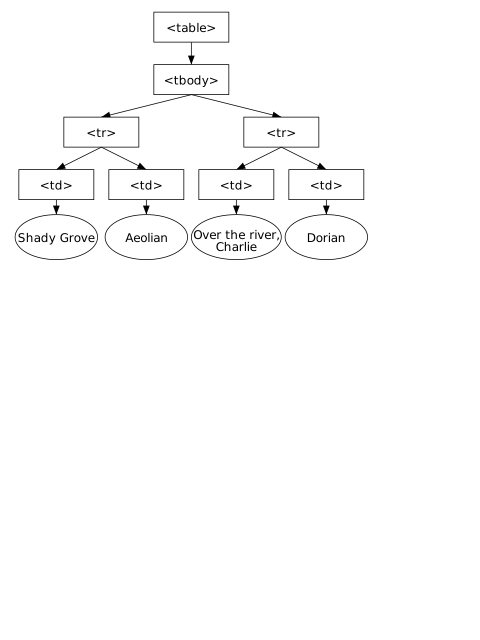
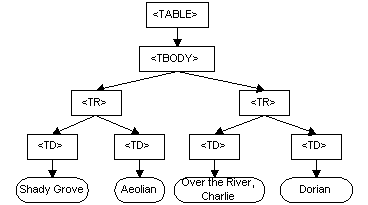 table.svg table.svg
|
DOM-Tutorial
DOM in einer HTML-Seite
Übungen mit Python
Aufgabe 1
Erkunde den Baum zu kreis.xml. Achte auf Text-Knoten. Zeichne den Baum mit Inkscape.
Aufgabe 2
Es soll eine JFlap-Datei b1.jff eines NFA für eine spätere Python-Eingabe mit Hilfe des DOM ausgewertet werden.
<?xml version="1.0" encoding="UTF-8" standalone="no"?><!--Created with JFLAP 6.4.--><structure>
	<type>fa</type>
	<automaton>
		<!--The list of states.-->
		<state id="0" name="q0">
			<x>88.0</x>
			<y>128.0</y>
			<initial/>
		</state>
		<state id="1" name="q1">
			<x>241.0</x>
			<y>126.0</y>
			<final/>
		</state>
		<!--The list of transitions.-->
		<transition>
			<from>1</from>
			<to>1</to>
			<read>1</read>
		</transition>
		<transition>
			<from>0</from>
			<to>0</to>
			<read>0</read>
		</transition>
		<transition>
			<from>0</from>
			<to>1</to>
			<read>0</read>
		</transition>
		<transition>
			<from>1</from>
			<to>0</to>
			<read>1</read>
		</transition>
		<transition>
			<from>0</from>
			<to>1</to>
			<read>1</read>
		</transition>
	</automaton>
</structure>
Zunächst könnte man sich einen Überblick über die Zustände verschaffen. Mit states = document.getElementsByTagName('state') bekommt man eine Liste aller 'state'-Elemente. Es interessieren nun die Attribute. Für jedes Element e aus der Liste states kann man mit e.attributes.items() auf die Liste der Attribute zugreifen. Die wiederum sind als Tupel bestehend aus Name und Wert organisiert.
>>> import xml.dom.minidom
>>> document = xml.dom.minidom.parse('b1.jff')
>>> states = document.getElementsByTagName('state')
>>> for e in states:
	print(e.attributes.items())
Erweiterte Möglichkeiten:
>>> for e in states:
	art = ''
	if len(e.getElementsByTagName('initial')) > 0:
	    art = art + 'i'
	if len(e.getElementsByTagName('final')) > 0:
	    art = art + 'f'
	print(art,e.getAttribute('id'))
Experimente zum Zugriff auf die Transitionen:
>>> transitions = d.getElementsByTagName('transition')
>>> transitions
[<DOM Element: transition at 0x8da944c>, <DOM Element: transition at 0x8e1b10c>,
<DOM Element: transition at 0x8e1b48c>, <DOM Element: transition at 0x8e1b66c>,
<DOM Element: transition at 0x8e1b84c>]
>>> t = transitions[0]
>>> t
<DOM Element: transition at 0x8da944c>
>>> c = t.childNodes
>>> c
[<DOM Text node "'\n\t\t\t'">, <DOM Element: from at 0x8da94ac>, <DOM Text node "'\n\t\t\t'">,
<DOM Element: to at 0x8da952c>, <DOM Text node "'\n\t\t\t'">, <DOM Element: read at 0x8da95ac>,
<DOM Text node "'\n\t\t'">]
Man sieht, dass es - vielleicht unvermutet - einige 'whitespace-Textknoten' gibt. Ein vollständiger Baum muss alle Knoten enthalten!
Wie setzt man das 'Current Working Directory'?
Es stellt sich öfter das Problem, dass eine Datei gefunden werden soll. Will man nicht mit absoluten Pfaden arbeiten, so ist es praktisch, in Idle das Arbeitsverzeichnis einstellen zu können.
>>> import os
>>> os.getcwd()
'/home/mk'
>>> os.chdir('/home/mk/h')
>>> os.getcwd()
'/home/mk/h'
Links
- DOM - wikipedia
- Document Object Model - www.w3.org/DOM
- Document Object Model (DOM) Technical Reports - www.w3.org
- IDL - wikipedia